 Sumory
Daily ledger
It starts with a receipt.
Save the slip, check the amount, and file it on the day the money changed hands. The same ledger keeps income, spending and the invoices you will need later.
View on the App Store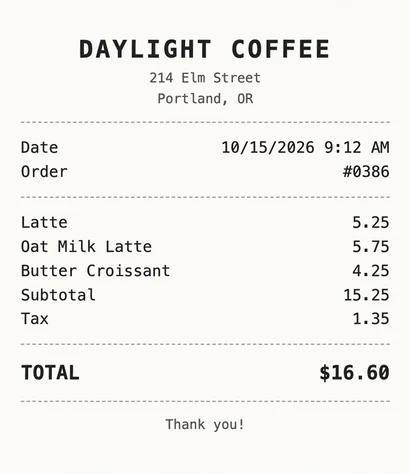
Keep the slip from your morning coffee.
Scan a receipt from the Ledger, or choose an order or payment screenshot from Photos or Files. The scanner finds the edges, straightens the page and keeps its colors. Drag the corners yourself or capture several pages in a row.
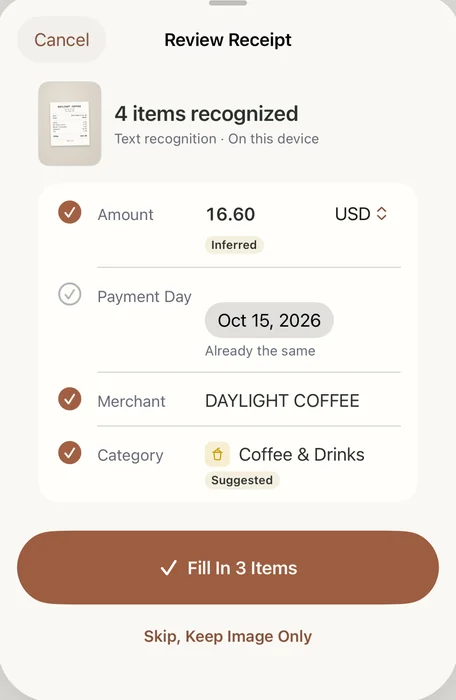
Read the proposed entry before you save it.
Your iPhone reads the amount, currency, payment date, merchant, category and note. Select the suggestions you want to use. A date you have already entered stays in place unless you choose to change it.
Where to find it a month later
- Ledger entries
- Look back by payment date, then narrow down income, spending and notes with search or filters.
- Purchase evidence
- Keep receipts and order screenshots with the entry. Open the original image when you need a closer look.
- Invoice Cabinet
- Store formal invoices separately so they are easy to retrieve when it is time to claim an expense.